Tempera Cell Matrix
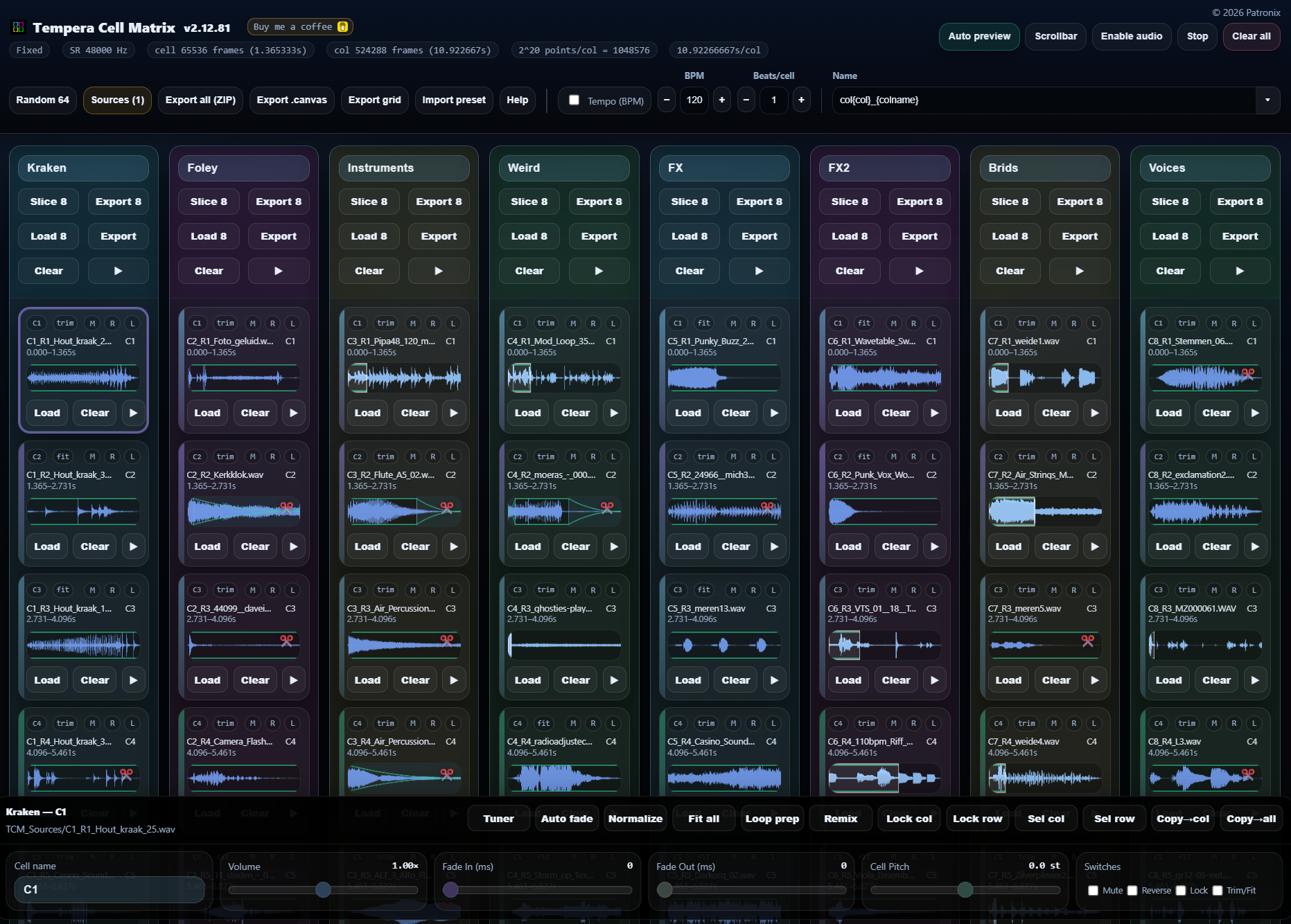
TCM is a fast browser-based sample matrix for building Beetlecrab Tempera-ready .canvas files. Slicing loops, tuning cells, preparing sampler grids and exporting clean WAV/ZIP presets without leaving the browser.
🔥 TCM v2.13.65 🔥
A big update focused on the new Matrix Slicer, recovery workflow, wavetables and faster editing.
🆕 NEW
🧩 Matrix Slicer
Load one long sample, place custom In/Out points, and spread selected parts across the full 8×8 matrix.
✂️ Point-based slicing
Use the mouse, playback position, or shortcuts to create precise segment pairs instead of fixed slices.
🔍 Segment zoom workflow
Click segment blocks to zoom in, edit In/Out points, jump between segments and fine-tune quickly.
🎚️ Per-segment volume and fades
Adjust volume directly on the waveform and draw fade-in/fade-out handles per segment.
🧼 Segment Normalize and Auto fade
Normalize and apply Auto fade inside segment mode, based on what the segment actually sounds like.
🎵 Segment Tuner
Tune individual Matrix Slicer segments with a compact tuner and non-destructive per-segment pitch.
🧭 Pitch-aware placement
Tuned segments update their effective length, cell span, playhead, preview, Apply and exports.
🏷️ Segment naming
Name segments for cleaner WAV exports and automatic matrix cell names after Apply.
📦 Export segments
Export all Matrix Slicer segments as separate WAV files for reuse outside the matrix layout.
🌊 Export WT from Matrix Slicer
Create experimental Tonverk-style wavetables from a selected segment.
🧪 Matrix Export WT
Export a 64 × 2048 wavetable directly from loaded matrix cells using cycle-scan.
🛟 Autosave toggle
Autosave can now be paused from the header.
🕒 Auto save
TCM automatically stores a local recovery snapshot about once a minute when something changed. Audio is not stored.
💾 Local Quick save
Ctrl/Cmd+S saves a local recovery snapshot, and S opens Export all.
🔁 Recovery relink retry
If you accidentally pick the wrong folder during recovery relink, TCM returns to the relink screen instead of losing the recovery.
⌨️ More editor shortcuts
Matrix Slicer now has a cleaner shortcut workflow for segment navigation, tuning, Normalize, Auto fade and quick saving.
🧰 Improved Sources workflow
The Sources window can now open Random 64 filters directly.
🌊 Wave Editor shortcut
Press E to open the selected cell directly in the Wave Editor.
Made a YouTube tutorial how to use the new Matrix Slicer:
## What TCM can do
TCM gives you an **8 × 8 sample matrix** for preparing, slicing, tuning,
editing and exporting samples for Tempera and other sampler workflows.
### Sample matrix workflow
- Load samples into individual cells or full columns.
- Use **Load 8**, **Random 8** and **Random 64** for fast sample filling.
- Keep important cells safe with **Cell Lock**, **Lock row** and **Lock col**.
- Use reusable **Random Sources** folders for fast random sample selection.
- Duplicate detection helps avoid repeated samples when possible.
- Auto preview lets you hear cells while navigating the matrix.
### Editing and performance tools
- Adjust **Volume**, **Fade in**, **Fade out**, **Reverse**, **Mute** and
**Trim/Fit** per cell.
- Use **Cell Pitch** to tune individual cells.
- Open the compact **Tuner** to fine-tune stable-pitch samples.
- Apply **Auto fade** with Click-safe, Soft, Strong or Custom presets.
- Normalize one cell or multiple selected cells.
- Use multi-select to edit groups of cells quickly.
- Undo is available for important destructive actions.
### Wave and Slice editing
- Open the **Wave Editor** from any cell waveform.
- Trim exact sample regions with zoom and handle control.
- Use optional **Snap** to place edges on nearby zero crossings.
- Use the **Slice Editor** to divide one sample into 8 playable cells.
- Zoom and magnifier tools help with precise edits.
- Slice and Wave Editor settings are designed for quick keyboard workflow.
### Long sample handling
- Keep long samples trimmed inside one cell.
- Overflow long samples into the cells below.
- Use **Overflow + Fit** to fit a long sample across multiple cells.
- Use **Overflow + Tune** to tune first, then spread the sample.
- Overflow exports stay seamless across cell boundaries.
### Creative column tools
- **Loop prep** loads one loop, fits it to the BPM grid and slices it.
- **Remix** creates quick column variations such as Reverse, Rotate,
Odd/Even and Random order.
- **Fit all** quickly prepares long loaded samples for timing-based playback.
### Import and export
- Export individual columns or all loaded material as WAV/ZIP.
- Export directly to a real **Tempera `.canvas`** file.
- Optionally use an existing Tempera `.canvas` as a settings template.
- Export and import **template-only presets** without audio.
- Export portable ZIP presets with embedded samples.
- Import presets and relink sample folders when needed.
- Export filenames can use templates, including cell names.
### Sampler grid export
- Export loaded cells as one evenly sliced **Grid WAV**.
- Supports 4, 8, 16, 32 or 64 slice grids.
- Empty cells are skipped automatically.
- Choose **48 kHz** or **44.1 kHz**.
- Designed for Digitakt II Grid Machine and useful for MPC, Force,
SP-404MKII, Octatrack, Polyend Tracker/Play and 1010music Blackbox.
### Interface
- Runs fully in the browser.
- No installation required.
- Works as a visual sample-prep tool for desktop and tablet workflows.
- Matrix palettes can be changed by clicking the app logo.
- Help, shortcuts and release notes are built into the app.
- Tempera utility
- Shared by Patronix 6 months ago
- Modified 4 months, 1 week ago
- Opened 651×
- Download HTML
- Open
How to use
You may need a browser with
Web MIDI support.
This is currently natively supported in Chrome and Firefox, while support for Safari can be enabled with a browser extension.
You may need a browser with Web MIDI support. This is currently natively supported in Chrome and Firefox, while support for Safari can be enabled with a browser extension.